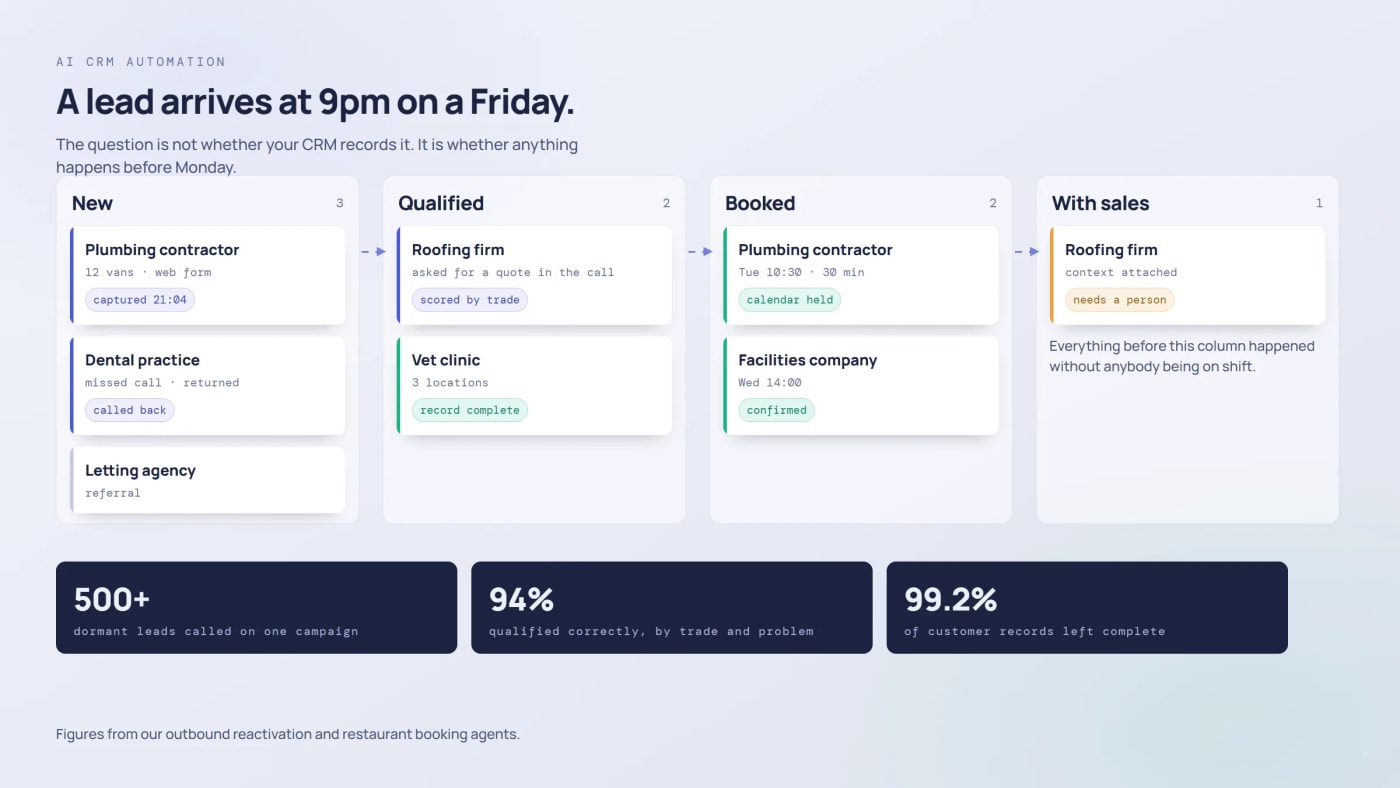
Most CRMs are filing cabinets with a sales theme. Somebody types what happened, somebody else reads it later, and the system itself never does anything. The interesting change is not that AI can summarise those notes. It is that the CRM can now act: score the lead, make the call, write the record and move the deal.
This is what that looks like in practice, which parts of it actually pay, and what has to be true in your data before any of it works.
One number for scale, with its caveat. Fortune Business Insights puts the CRM market at $126.17 billion in 2026, reaching $320.99 billion by 2034. Other firms measuring the same category land anywhere between roughly $73 billion and $334 billion, so treat it as direction rather than measurement. The adoption and return figures doing the rounds, the 83% of users, the 41% productivity jump, the return of $8.71 per dollar, all trace back to vendor pages or studies a decade old. We left them out.
What AI CRM Automation Actually Means
Rules-based automation fires on a match: a form submitted, a stage changed, a date passed. Useful, and brittle. The difference now is that one of those steps can weigh something up, and the step after it can finish the job instead of filing a task for a human to find on Monday.
A practical test: if your CRM can only tell a person what to do next, it is reporting. If it can do the next thing and write down what happened, it is automation.
The Five Parts That Pay
1. Scoring that learns instead of counting points
Fixed scoring hands ten points to a job title and five to a page visit, and goes out of date quietly. The version worth building reads behaviour: what they looked at, how often, in what order, how they answered when somebody asked.
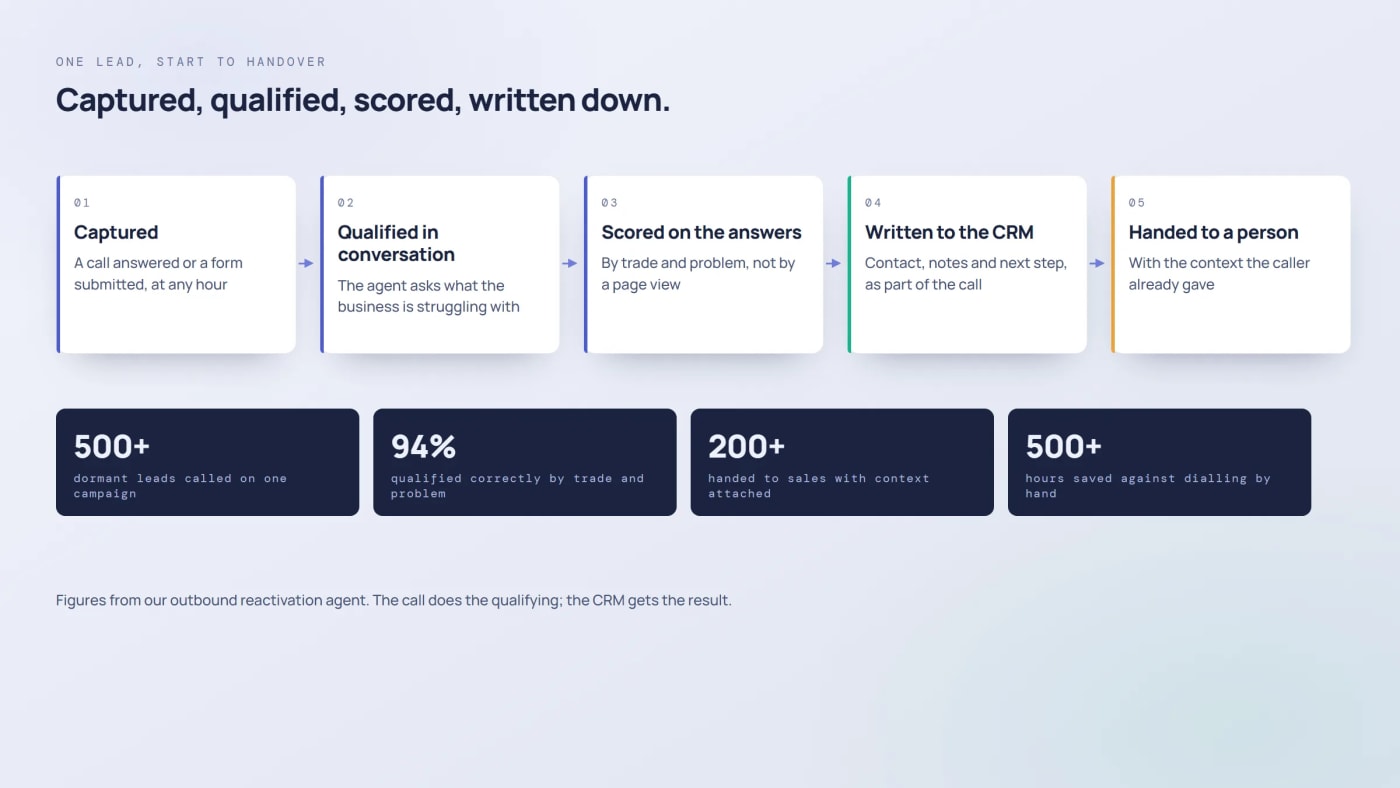
Ours does the asking. The outbound reactivation agent called more than 500 dormant leads, opened with the event they came from, asked each business what it was struggling with, and scored the answers. It qualified 94% correctly by trade and problem, 87% stayed in the conversation rather than hanging up, and more than 200 reached sales with context attached. That is scoring from a conversation rather than from a page view.
2. Follow-up that reacts to behaviour
Deals die in the gap. Somebody downloads a guide on Tuesday, nobody calls until Friday, and by then they have spoken to a competitor.
Two mechanics fix most of it. Scheduled follow-ups that fire on their own, which in our field-service platform means Celery Beat sending quote reminders at intervals the business sets rather than when somebody remembers. And triggered follow-ups, where a signal starts the sequence: a pricing page revisited, a quote unopened for a week, a call that ended without a booking.
3. Records that write themselves
Data entry is the tax everyone pays and nobody budgets for, and the records it produces are patchy in exactly the way that breaks scoring and forecasting later.
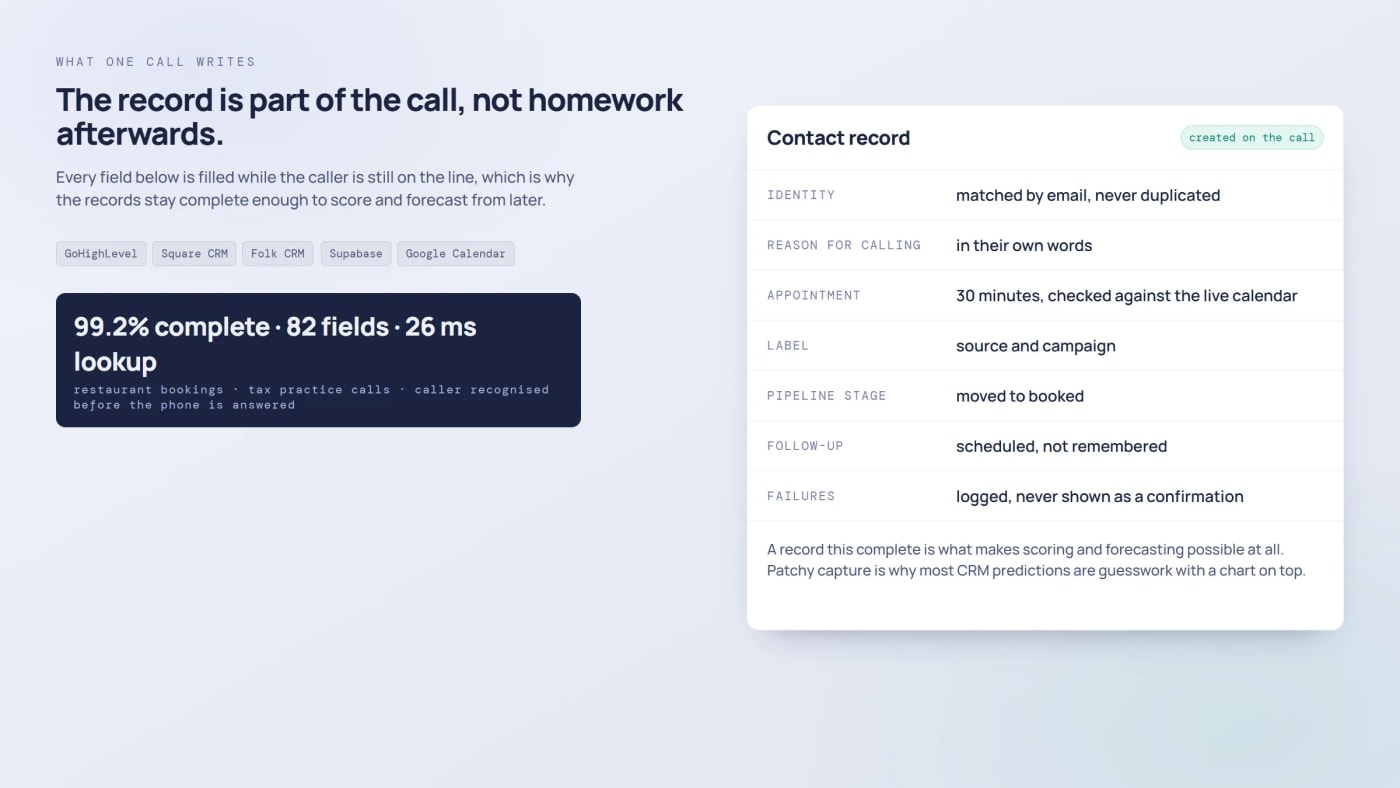
Our voice agents treat the record as part of the call rather than homework afterwards. The restaurant booking agent completes 99.2% of customer records because the fields are checked on the call rather than assumed. The pet care agent creates the contact in Square CRM as part of the booking, so nothing is left to type in. The tax practice receptionist captures 82 fields per call and recognises the caller before the phone is answered, because a lookup runs in 26 ms while the line is still ringing.
4. Forecasting, which is downstream of everything above
Forecasts built on what reps say are optimistic in good quarters and pessimistic in bad ones. A model reading pipeline velocity, stage ages and historical outcomes is better, but only if the stages are honest and the records are complete.
That is the uncomfortable order of operations. Nobody can forecast their way out of a CRM where half the opportunities have not been touched in a month. Fix the capture first and the prediction becomes possible.
5. Agentic: the CRM doing the work
The shift this year is from advising to executing, and our own consultation booking is a small complete example of a CRM doing its own work. The visitor picks a time. From there the system confirms the request is still valid, screens for bots before holding any calendar time, finds or creates the contact by email so nobody ends up with two records, writes a 30 minute appointment into the GoHighLevel calendar, labels the contact, and puts an opportunity at the booked stage or moves the one that already exists.
Two decisions in there are worth copying. The first is that a failed appointment shows an error and never a confirmation, because a false booking is the costliest outcome the flow can produce. The second is that the labelling and the pipeline move run on a best effort basis: the slot is held by then, so if either one fails it goes to the log and the visitor is told nothing that is not true.
What This Changes at Different Sizes
- Small teams. The point is coverage, not volume. Nobody is free to chase every lead on a busy week, and an agent that answers, qualifies and books does not have busy weeks.
- Growing teams. The point is consistency. Ten reps follow up ten different ways; automation makes the floor the same for every lead regardless of who owns it.
- Large teams. The point is triage. With thousands of open deals the question is which ones need a person this week, and that is a scoring and routing problem rather than a staffing one.
A Roadmap That Does Not Collapse
- Audit the data first. Duplicates, empty fields, stages nobody has moved in months. Automation on bad data produces confident nonsense faster.
- Start where volume is high and judgement is low. Capture, qualification and follow-up. Those earn the trust that pays for the rest.
- Connect the sources. Calls, forms, email, billing and support all feed the same record. The CRM gets smarter in proportion to what reaches it.
- Build around your sales process. A template thinks every business sells the same way. Yours does not, and the scoring rules and triggers should match how your team actually works.
- Measure a few things, honestly. Response time, share of leads qualified without a person, record completeness, and hours returned. On one campaign ours returned more than 500 hours against dialling the same list by hand.
Four Mistakes We Keep Seeing
- Automating onto dirty data. The duplicate contact gets two sequences, the stale deal gets chased, and the team stops trusting the system within a fortnight.
- Leaving the reps out of the design. If nobody can explain why a lead scored high, the score gets ignored and the project quietly dies.
- Automating the moments that should be human. Routine follow-up, yes. The negotiation and the difficult conversation, no. Use the system to find those moments, not to handle them.
- Treating it as a one-time setup. Scoring drifts as the market moves. Somebody has to own the feedback loop between what closed and what the model believed.
What Teams Ask Us
Do we need a new CRM?
Usually not. Most of this work attaches to what you already run through APIs and webhooks, which is how our agents write into GoHighLevel, Square and Folk. A replacement makes sense when the current system cannot be written to reliably, not because it lacks an AI badge.
Where does the automation itself live?
In an orchestration layer beside the CRM rather than inside it. We use n8n and Make for that, and compared the options with the workflows we run on each. Keeping the logic outside the CRM means changing it does not mean migrating it.
How quickly does it show up in the numbers?
Capture and follow-up show up immediately because they remove a delay you can measure today. Scoring takes longer, because it needs enough closed and lost outcomes to learn from. Forecasting is last, and it depends on the first two being in place.
Will this replace sales people?
It replaces the parts of the job nobody wanted: dialling lists, typing notes, chasing people who were never going to buy. What is left is the part that closes deals, which is also the part that needs a person. The version where the system acts on the deal by itself, and what a recorded call gives you, is covered in our piece on agentic CRM. More on where that line sits in our piece on voice agents.
What does it take to run?
Somebody who owns the data rules, somebody who reviews what the automation did each week, and a budget line for model usage. The build is finite. The ownership is not, and projects fail far more often on the second than the first.
Start With the Lead You Lose Most Often
Not a strategy, a single leak. The call nobody picked up, the form that waits a day for a reply, the list nobody has time to work through. Automate that one path end to end, including what gets written down, and let the result argue for the next one. How we scope that kind of build is set out in the guide to agents in a business.
If you want a second opinion on which leak to close first, we offer a free 30-minute consultation, and the AI automation and AI agents page covers how a build runs. We have been connecting AI to real sales systems since 2020, with an Upwork feedback average of 4.99.
One for the comments: what happens at your company when a lead arrives at 9pm on a Friday?

Building AI-Powered SaaS Products, Mobile Apps & Business Automation | Trusted by Clients in 20+ Countries

Comments
No comments yet. Be the first to share your thoughts.
Leave a comment